Elixir for Mac
Before your Mac dies,
you'll know.
A battery app for your menu bar, with alerts you can't miss.
Free · Version 0.8.2 · macOS 15 or later · Apple silicon

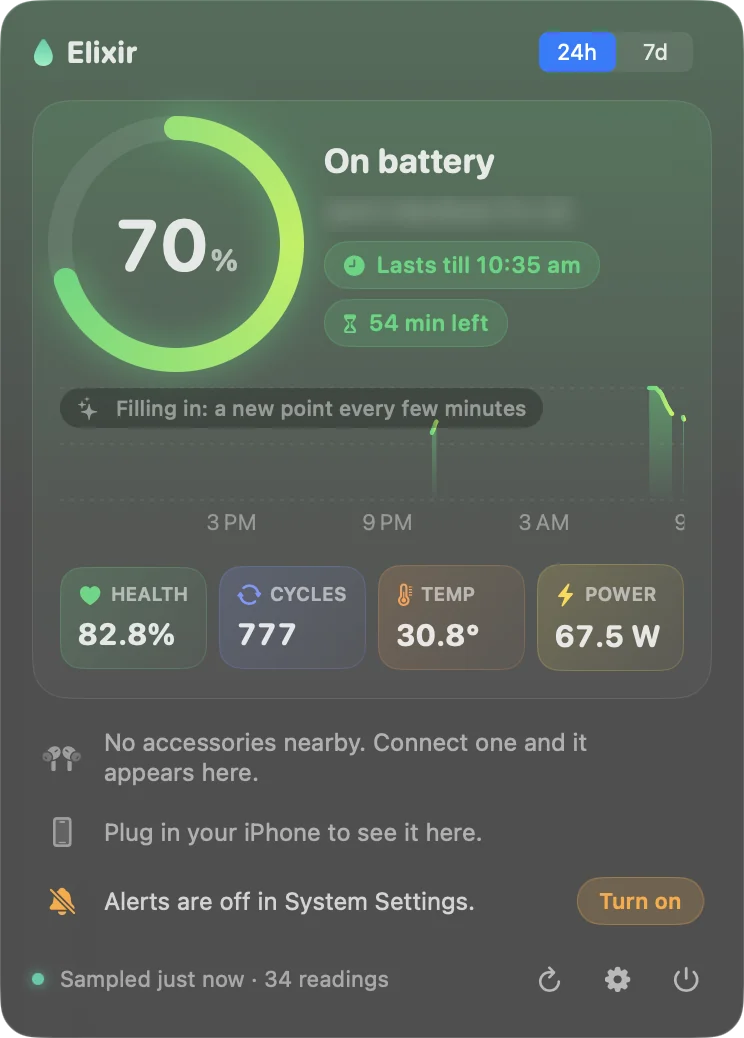
The menu-bar battery and the menu are real screenshots from Elixir. The ring is drawn for the web.
Sound familiar
Two little grey alerts.
Then a black screen.
The Mac's own warning is a small notification in the corner. One turns up at 10%, and you swipe it away because you're in the middle of something. Another comes near the very end, and then the screen goes black and whatever you hadn't saved goes with it.
Drawn for the web.
The answer
Alerts you can't miss.
When the battery drops past one of your alerts, the edges of every display glow in that alert's colour and a card drops in at the top centre, then both get out of your way. It won't stop your Mac running out, but it makes sure you notice in time to plug in.
Elixir's default alerts for a Mac. Drawn for the web.
Your levels
As many alerts as you want,
wherever you want them.
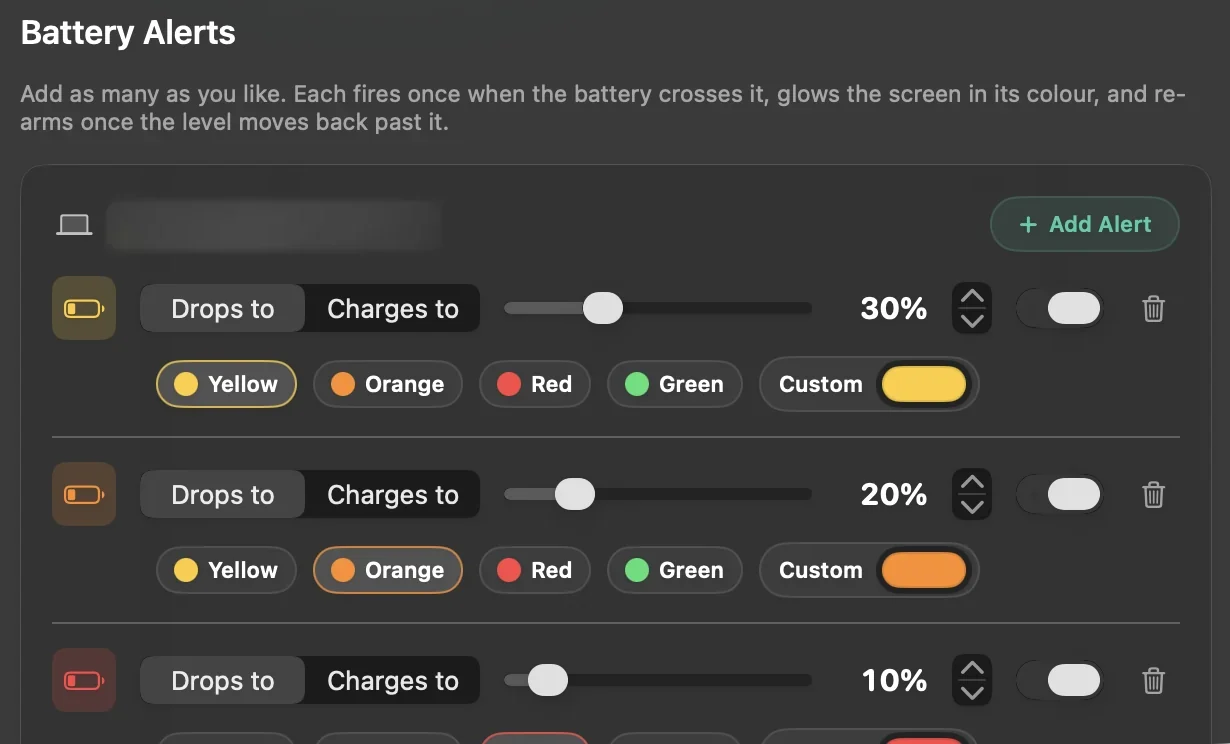




Alert cards
A glass card drops in.
Then it gets out of your way.
- At the top centre of the screen your pointer is on, with a ring in the alert's colour and one line about what to do.
- Gone in about four seconds. Hover to keep it, click to open the menu, or swipe it up and away.
- For every device, so a nearly flat AirPods case gets its own card too.
- Its own window, so it shows even with notifications off.




Real cards from Elixir 0.8.
A clean menu bar
One tidy icon,
with the number inside.
Elixir adds one small battery to your menu bar, drawn like the one on an iPhone with the level written right in it, and nothing else. A bolt joins the number while you charge. If you'd rather, Settings puts the number beside the battery or leaves the icon on its own.

Most of the day
The fill shrinks as you go, and the number stays easy to read.
Always in the know
Know where your battery is.
And when it'll run out.
- The level, one glance away in your menu bar, wherever you are on your Mac.
- A lasts-till time and the minutes left, worked out from how fast the battery is going down right now.
- A full-by time while it charges, so you know when you can unplug.
- A chart for every device over the last day or week. When Elixir wasn't looking, the chart shows a gap instead of guessing.
A real Elixir menu. The Mac's name is blurred.

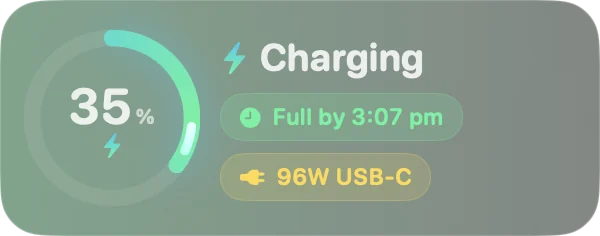

The green glow and the cards, captured from Elixir.
Plug in
Plug in,
and Elixir notices.
- Within a second a card shows your level on a charging ring, when it'll be full, and the charger's watts.
- A short green glow around the screen tells you the cable is really in.
- Unplug, and a small card says you're on battery and how long it'll last.
- Yours to switch off, card by card and glow by glow, in Settings.
Every device
Every battery around you,
in one menu.
Click the battery in your menu bar and everything Elixir can see is there: your Mac first, then whatever you have connected.
Your Mac
Level, time left, health, charge cycles, temperature and the charger's watts, read straight from the battery.
AirPods
Left, right and the case, while they're connected to this Mac.
Magic Mouse
Plus the Magic Keyboard and Trackpad. No Bluetooth permission needed.
Magic Keyboard
Its own history chart and its own alerts, like every device.
iPhone and iPad Beta
Plug in with a cable and tap Trust. Elixir only reads the battery.
Drawn for the web with demo levels.
Keeps an eye on
Insights
Temperature, watts and health.
The numbers worth a look.
Open the menu and the good stuff is right there, read straight from your Mac's battery.
How warm the battery is right now.
On battery, the watts your Mac is drawing right now. Plugged in, what the charger is rated for.
What the battery holds today against when it was new, with Apple's own figure beside it.
How many full charges the battery has been through.
Which charger you're on, the moment you plug in.
Numbers from the real menu and plug-in card shown on this page.
Privacy
Your battery,
your business.
The only time Elixir goes online is to check its own site for updates. You can switch that off. It reads this Mac and the devices you connect, and its history lives in a file in your own Library folder. There's no account to make, and nothing is tracked.
Light on your Mac
It barely touches your CPU.
And it comes back if it ever stops.
Quiet while you work
The menu is built when you open it and put away when you close it. In between, Elixir waits for something to change and checks your devices every five minutes by default.
Back on its own
If Elixir ever crashes, macOS starts it again within about ten seconds, so your alerts keep watching without you thinking about it.
Quit means quit
Choose Quit and Elixir stays closed until you next log in. Starting with your Mac is one switch in Settings.
Questions
Good questions.
How is this different from the Mac's own battery warning?
The Mac's own warning is a small grey notification in the corner, once at 10% and again near the end, and it's easy to swipe away without really taking it in. Elixir makes the edges of your screen glow in a colour and drops a card in at the top centre, at whatever levels you choose, as many as you like. It can't stop a battery running out, but it makes sure you notice in time to plug in.
Is Elixir really free?
Yes. Jack made it for himself and his friends, so there's nothing to buy, no trial and no account. Download it and it's yours.
Which Macs does it run on?
Macs with Apple silicon, M1 or newer, on macOS 15 Sequoia or later. Intel Macs aren't supported.
Will it make my battery last longer?
No, and it doesn't try to. Elixir shows you what your batteries are doing and tells you when to plug in or unplug. It doesn't limit charging or change any battery setting.
Does it slow my Mac down?
It barely touches your CPU. The menu is built when you open it and put away when you close it, and in between Elixir sits quietly until a reading changes. It checks your devices every five minutes by default.
Does it send anything anywhere?
No. The only time Elixir goes online is to check its own site for updates, and you can switch that off in Settings. That check sends nothing about you or your Mac. There's no tracking, no analytics and no account, and your battery history stays in a file on your Mac.
Which devices can it read?
Your Mac in depth, AirPods while they're connected (each bud and the case), and a Magic Mouse, Keyboard or Trackpad. iPhone and iPad over a cable are in beta.
Does it work with notifications turned off?
Yes. The glow and the cards are Elixir's own windows, so they show even when macOS notifications are off. Sending a banner to Notification Centre as well is an option you can turn on.
Can it hide the Mac's own low-battery warning?
It can, if you want it to. Elixir offers it when you first open it, it's off unless you switch it on, and it needs Accessibility permission to close that one alert. It's still in beta.
How do updates work?
From version 0.8.2, Elixir checks this site once a day for a newer version. When there is one, it downloads it, checks Apple's signature and its own, installs it quietly and shows you what's new. Switch it off in Settings, General, and press Check Now whenever you like. If you have 0.8.1 or older, download 0.8.2 from this page once.
How do I stop it opening at login?
Open Settings and switch off Open at Login. If you choose Quit, Elixir stays closed until you next log in.
Are there widgets, or Apple Watch support?
Not yet. Today Elixir lives in your menu bar, with its glow and its cards.

See it coming,
and plug in in time.
Free · Version 0.8.2 · macOS 15 or later · Apple silicon
- 1Open the disk image.
- 2Drag Elixir into Applications.
- 3Open it, and it says hello from your menu bar.
Signed with a Developer ID and notarized by Apple.